M12 Connector for EtherCAT: Wiring & Configuration
M12 connectors for EtherCAT: which coding to use (D vs X), the pinout, shielding and cabling for reliable high-speed industrial Ethernet.
M12 Connector for EtherCAT: Wiring & Configuration
Quick AnswerOn this page
Quick Answer
EtherCAT runs over industrial Ethernet, so it uses standard Ethernet M12 connectors: D-coded (4-pin) for 100 Mbit links, and X-coded (8-pin, four shielded pairs) where Gigabit or 10 Gigabit bandwidth is required. Choose the coding from the speed your devices specify, keep the cabling properly shielded end to end, and you have a rugged, sealed EtherCAT connection suited to the factory floor.
EtherCAT and M12
EtherCAT is a high-performance, real-time industrial Ethernet protocol widely used for motion control and fast I/O. Because it is Ethernet-based, it uses the same physical M12 connectors as other industrial Ethernet networks rather than a special EtherCAT-only connector. That means the M12 coding you choose depends on the data rate, exactly as it does for PROFINET or EtherNet/IP.
What EtherCAT adds is sensitivity to timing and signal integrity: it is often deployed close to drives and motors, which are electrically noisy, and it depends on clean, reliable links. This makes correct coding, shielding and cabling especially important. For how the M12 codings compare in general, see the M12 connector types guide.
Which Coding: D-Coded or X-Coded?
The choice mirrors the rest of industrial Ethernet. For 100 Mbit EtherCAT links, the D-coded 4-pin connector is used — the same connector that serves PROFINET and EtherNet/IP at that speed; see the D-coded for PROFINET guide. When the application needs Gigabit or 10 Gigabit bandwidth, the X-coded 8-pin connector takes over, carrying four shielded pairs; see the X-coded for 10GbE guide.
Let the devices decide: a node's datasheet states the connector and speed it provides. Match it, and the keying guarantees mechanical compatibility as well. Do not try to mix codings on a single link — D and X cannot be mated, by design.
The X-Coded EtherCAT Pinout
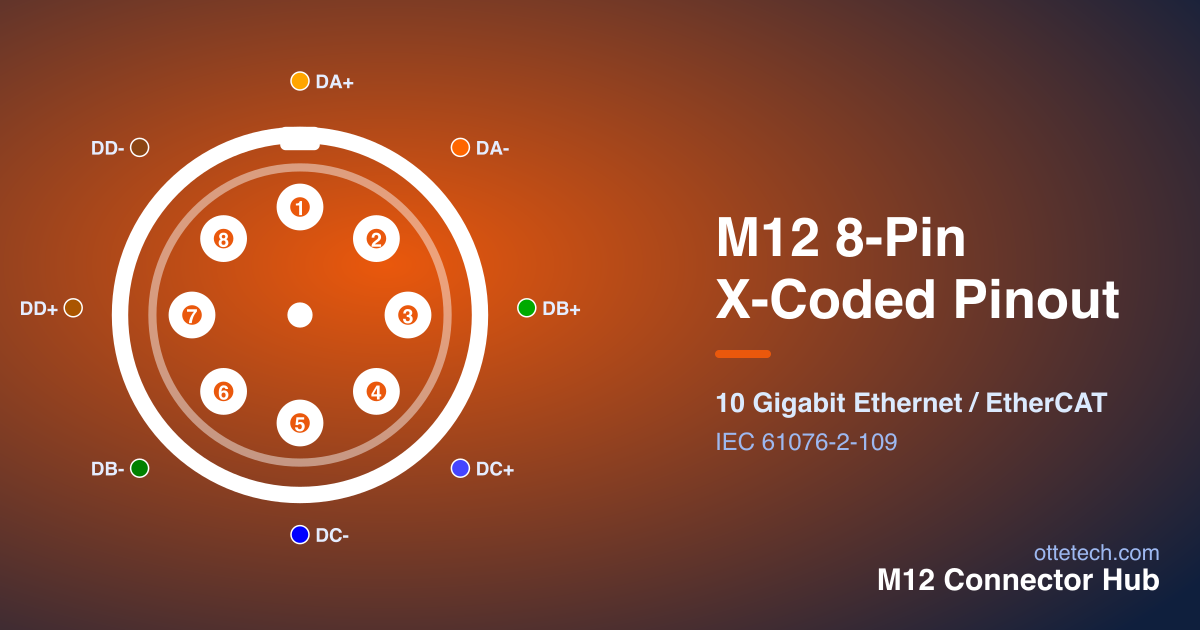
For higher-speed EtherCAT, the 8-pin X-coded layout is shown below. Hover a contact to highlight it in the table.
| Pin | Signal | Wire Color | Function |
|---|---|---|---|
| 1 | DA+ | White/Orange | Pair A Data + |
| 2 | DA- | Orange | Pair A Data - |
| 3 | DB+ | White/Green | Pair B Data + |
| 4 | DC+ | White/Blue | Pair C Data + |
| 5 | DC- | Blue | Pair C Data - |
| 6 | DB- | Green | Pair B Data - |
| 7 | DD+ | White/Brown | Pair D Data + |
| 8 | DD- | Brown | Pair D Data - |
The eight contacts form four shielded pairs. There is no power contact — it is a data-only interface — so nodes that need power use a separate power connector. For how to read the layout and the male/female mirror, see the M12 connector pinout guide, or browse every configuration in the Pinout Viewer.
Wiring and Shielding
Reliable EtherCAT over M12 depends on the whole channel, not just the connector. Keep each pair twisted right up to the contacts, carry the cable shield through the connector end to end, and use cable that is properly shielded and category-rated for the target speed. At Gigabit speeds on X-coding this is not optional — under-specified cable or a broken shield will degrade or kill the link, and near drives the noise environment is unforgiving.
Treat the connector and cable as a matched assembly, and prefer pre-moulded cordsets where you can, since they remove termination variability. As with any M12, tighten the coupling to the specified torque so the connection is both sealed and mechanically secure against the vibration common around motion systems. The installation guide covers the termination and torque steps in detail.
EtherCAT Topology and M12
EtherCAT networks are typically wired in a line or ring, with each node passing the signal to the next, which means most nodes have two Ethernet ports — an in and an out. On the machine, that translates into two M12 Ethernet connectors per node, of the coding the device specifies. The sealed, locking M12 suits this daisy-chained topology well: connections out at the device do not work loose under vibration, and the IP rating protects each hop.
Because the network depends on every link in the chain, a single bad connection can disrupt nodes downstream of it. That raises the importance of correct termination and shielding at every node, not just at the controller. Keeping cordset lengths and routing tidy also helps maintenance — a clearly labelled, well-dressed chain is far easier to fault-find than a tangle. For how the codings differ, see the M12 connector types guide.
Troubleshooting EtherCAT Links
When an EtherCAT link misbehaves, the usual suspects are physical. Check that the connector coding and pinout match the device, that the cable is properly shielded and category-rated for the speed, and that the shield is carried through end to end — a broken shield near drives is a classic cause of intermittent errors. Confirm the coupling is tightened to torque, since a loose connector can drop the link under vibration.
For X-coded Gigabit links especially, verify the cable actually supports the rated speed and that each pair is correctly placed and twisted to the contact. A link that negotiates down or shows errors only under load often points to marginal cabling rather than the device. Working hop by hop along the chain, and substituting a known-good pre-moulded cordset to isolate a suspect run, resolves most physical-layer faults. The installation guide covers termination and verification in detail.
Putting It Together
For an EtherCAT deployment, the workflow is straightforward: confirm each node's required speed and connector from its datasheet, choose D-coding for 100 Mbit or X-coding for higher bandwidth, use properly shielded category-rated cable, and terminate to the correct pinout and torque. That gives you EtherCAT's real-time performance in a sealed, vibration-resistant, standardised connector.
To shortlist EtherCAT-suitable M12 connectors by protocol, pin count and IP rating, browse our 8-pin M12 connectors, use the connector selector, or send your network's requirements through the inquiry form for a quote.
In short, the connector side of EtherCAT is not exotic: it is standard industrial Ethernet over rugged, sealed M12, with the coding chosen by speed and reliability driven by shielding and proper termination. Get those fundamentals right at every node and the network gives you EtherCAT's deterministic, real-time performance in an environment that would defeat office-grade connectors. The same M12 ecosystem — standardised parts, wide availability and quick cordset replacement — that benefits other industrial Ethernet protocols applies equally here.
Key Takeaways
- EtherCAT uses standard industrial Ethernet M12 connectors — no special EtherCAT-only connector.
- Choose D-coding (4-pin) for 100 Mbit links and X-coding (8-pin) where higher bandwidth is needed.
- Most nodes have two ports (in/out) for the line/ring topology — two M12 connectors per node.
- Shielding and proper termination at every node are critical near drives and motors.
- A single bad link disrupts nodes downstream — troubleshoot hop by hop with known-good cordsets.
Frequently asked questions
- Which M12 coding is used for EtherCAT?
- EtherCAT runs over industrial Ethernet, so it uses D-coded M12 connectors for 100 Mbit links and X-coded M12 connectors where higher bandwidth (Gigabit/10 Gigabit) is required. Match the coding to the speed the devices specify.
- Can I use a standard Ethernet M12 connector for EtherCAT?
- Yes — EtherCAT uses standard industrial Ethernet physical connectors. A D-coded M12 (100 Mbit) or X-coded M12 (Gigabit/10 Gigabit) is used depending on the required speed, with proper shielding for reliability.
- What is the difference between D-coded and X-coded for EtherCAT?
- D-coded is 4-pin for 100 Mbit Ethernet; X-coded is 8-pin with four shielded pairs for up to 10 Gigabit. Use D-coding for standard 100 Mbit EtherCAT and X-coding when the network needs higher bandwidth.
- Why is shielding important for EtherCAT over M12?
- EtherCAT is high-speed and often runs near motors and drives, which are electrically noisy. Proper cable shielding, carried through the connector end to end, keeps the link reliable and is essential at Gigabit speeds on X-coding.
Looking for 8-Pin M12 connectors?
Browse our 8-Pin M12 range, or send us your requirements for a quote — including custom assemblies and samples.