M12 D-Coded Connector for PROFINET Explained
The M12 D-coded connector for PROFINET and EtherNet/IP: 4-pin pinout, 100 Mbit Ethernet, wiring, shielding, and when to step up to X-coding.
M12 D-Coded Connector for PROFINET Explained
Quick AnswerOn this page
Quick Answer
The M12 D-coded connector is the connector for PROFINET and other 100 Mbit industrial Ethernet protocols such as EtherNet/IP. It is a 4-pin connector whose contacts carry the two transmit and receive pairs of 100BASE-TX, packaged in a sealed, locking M12 housing built for the factory floor. Its keying is distinct from the 4-pin A-coded sensor connector, so the two cannot be mixed up. When a network needs more than 100 Mbit, the 8-pin X-coded connector takes over.
What Is a D-Coded M12 Connector?
D-coding brought industrial Ethernet to the M12 form factor. Where A-coding handles sensor signals and B-coding handles PROFIBUS, D-coding handles 100 Mbit Fast Ethernet. Its four contacts map to the two pairs of 100BASE-TX — one pair to transmit, one to receive — which is exactly what PROFINET and EtherNet/IP run on at 100 Mbit.
The appeal of D-coding is that it combines familiar Ethernet networking with M12 ruggedness: IP-rated sealing, a threaded lock that resists vibration, and standardised parts that interoperate between manufacturers. That made it the default way to extend a network out to drives, cameras, remote I/O and smart sensors on a machine. For where D-coding sits among all the codings, see the M12 connector types guide.
The D-Coded Pinout
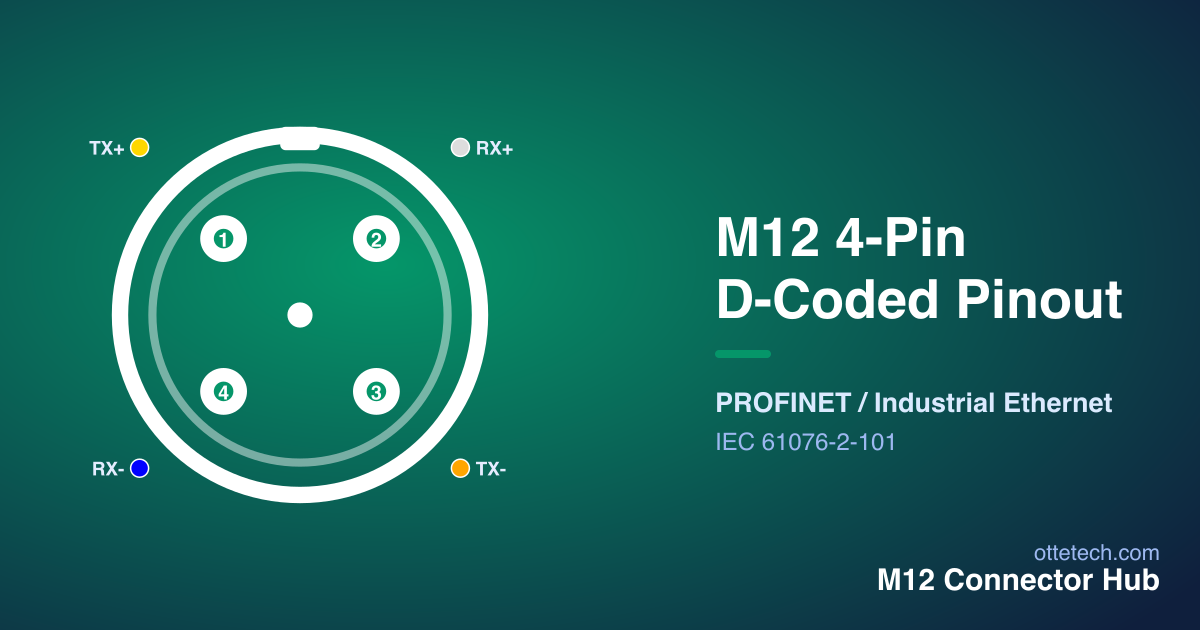
The diagram below shows the 4-pin D-coded layout. Hover a contact to highlight it in the table.
| Pin | Signal | Wire Color | Function |
|---|---|---|---|
| 1 | TX+ | Yellow | Transmit Data + |
| 2 | RX+ | White | Receive Data + |
| 3 | TX- | Orange | Transmit Data - |
| 4 | RX- | Blue | Receive Data - |
The four contacts carry the transmit and receive pairs of 100BASE-TX Ethernet. Note that there is no power contact on a standard D-coded connector — it is a data-only interface, so a device needing both power and network uses a separate power connector alongside it. For a fuller explanation of how to read M12 pinouts, including the male/female mirror, see the M12 connector pinout guide, or explore every layout in the interactive Pinout Viewer.
D-Coding for PROFINET and EtherNet/IP
PROFINET and EtherNet/IP are both Ethernet-based industrial protocols, and at 100 Mbit both use the D-coded M12 connector at the device. Choosing D-coding therefore follows directly from the protocol: if a device's datasheet specifies PROFINET or EtherNet/IP at 100 Mbit, it expects a D-coded port, and matching it guarantees both electrical and mechanical compatibility.
Because the connector is standardised, you can source D-coded cordsets from any compliant supplier and they will mate with the device. What matters for performance is keeping the cabling correct: the two pairs must be maintained as pairs and the shield carried through, so the link stays clean in the electrically noisy environment of a machine. Treat the connector and the cable as a system — a good connector on poor cable will still give an unreliable link.
It is also worth noting how widely D-coding is deployed. For the past decade of automation build-outs it has been the default way to bring Ethernet to field devices, so it is supported across switches, drives, cameras, remote I/O and smart sensors from virtually every vendor. That maturity means parts, cordsets and documentation are easy to find, and a maintenance technician can swap a failed D-coded cordset with a stock equivalent rather than a proprietary special — one of the practical advantages of choosing a standardised coding over a vendor-specific connector.
Wiring, Shielding and Cabling
Getting a D-coded link to work reliably is as much about the cable as the connector. The two pairs must be kept as pairs and stay twisted as close to the contacts as possible, because untwisting degrades the 100BASE-TX signal. The cable shield should be carried through the connector so the screen is continuous from device to device — important on a machine where drives and motors generate electrical noise that can corrupt an unshielded link.
For field-terminated connectors, wire strictly to the pinout table rather than from memory, and remember that the male and female faces are mirror images, so the contact positions flip between the plug and the socket you mate it to. After terminating, verify the link before relying on it: a quick check that each pair is correctly placed catches the most common faults. Where you can, use pre-moulded D-coded cordsets, which remove termination variability and guarantee the pairing and shield are correct. The installation guide covers termination and torque in detail, and the torque step matters here too — an under-tightened connector is neither sealed nor mechanically secure against vibration.
D-Coded vs A-Coded: Don't Confuse Them
A 4-pin D-coded connector and a 4-pin A-coded connector share a pin count but nothing else. The keying is different, the pinout is different, and the signals are different — one carries Ethernet pairs, the other carries sensor supply and switching signals. The coding system keys them so they physically cannot be cross-mated, which is exactly the protection you want on a machine full of 12 mm connectors.
The practical takeaway is to specify by coding, never by pin count alone. "4-pin M12" is ambiguous; "4-pin D-coded" is not. For a deeper comparison of signal versus network codings, see A-coded vs B-coded and the types guide.
When to Step Up to X-Coding
D-coding is limited to 100 Mbit because it uses only two pairs. When a network needs Gigabit or 10 Gigabit Ethernet — for machine vision, high-bandwidth backbones, or protocols like EtherCAT that demand more throughput — the 8-pin X-coded connector takes over, carrying four shielded pairs. If you are designing a new installation that might scale beyond 100 Mbit, decide early, because the connector and cabling differ. See the X-coded for 10GbE guide for that next step, and use the connector selector or browse our 4-pin M12 connectors (A- and D-coded) to shortlist parts by protocol and pin count.
Key Takeaways
- D-coded M12 is the 4-pin connector for 100 Mbit industrial Ethernet — PROFINET and EtherNet/IP.
- Its four contacts carry the two pairs of 100BASE-TX; there is no power on a standard D-coded connector.
- It is not interchangeable with the 4-pin A-coded sensor connector — different keying, pinout and signals.
- Keep pairs twisted and the shield continuous end to end for a reliable link near drives and motors.
- For Gigabit or 10 Gigabit, move up to the 8-pin X-coded connector; specify by coding, never by pin count alone.
- Being standardised, D-coded cordsets are widely stocked and second-sourced, so failed leads swap for off-the-shelf equivalents.
Frequently asked questions
- What is an M12 D-coded connector used for?
- The M12 D-coded connector is the standard interface for 100 Mbit industrial Ethernet, most importantly PROFINET and EtherNet/IP. Its 4 contacts carry the two transmit and receive pairs of 100BASE-TX in a sealed, locking M12 housing.
- How many pins does a D-coded M12 connector have?
- A D-coded M12 connector has 4 pins, carrying the two Ethernet pairs (transmit and receive) for 100 Mbit Fast Ethernet. There is no power on a standard D-coded connector.
- Is D-coded the same as A-coded with 4 pins?
- No. A 4-pin D-coded Ethernet connector and a 4-pin A-coded sensor connector have the same pin count but different keying, pinout and signals. They cannot be mated together, by design.
- When should I use X-coding instead of D-coding?
- Use D-coding for 100 Mbit Ethernet such as PROFINET and EtherNet/IP. When the network needs Gigabit or 10 Gigabit Ethernet, step up to the 8-pin X-coded connector, which carries four shielded pairs.
Looking for 4-Pin M12 connectors?
Browse our 4-Pin M12 range, or send us your requirements for a quote — including custom assemblies and samples.